Showing posts with label AJAX. Show all posts

Saturday, May 26, 2007

Asp Net & Javascript Avoid Multiple Submit (Only Allow Submit 1 Time)

This short tutorial will show you how to avoid multiple submissions from users by give an alert when user click or submit more than 1 time using JavaScript and asp net.
This function are suitable for ecommerce site or any pages that need do some registration or payment and etc.


Example situation, when you do a reservation for a flight and the online reservation service system didn't include the avoid multiple submit and the processing time for flight reservation system take more than your expect. You maybe thought that you didn't submit yet and when you click submit again. Maybe the online reservation system already helps you to book more than 1 ticket.

So, it is important to include this function to avoid you or your customer loose money.


Below is the code for this tutorial:
After you read and please give some comment (good and bad)

Javascript
<script language=javascript >
var is_form_submited=0;
function enableJS()
{
document.testing.jsEnabled.value="yes";
return true;
}

function processInput()
{
if (is_form_submited==1)
{
alert("Your request has been submitted. please wait..");
return false;
}

enableJS();
is_form_submited=1;
return true;
}
</script>


.ASPX page
<body>
<form id="testing" runat="server" onsubmit="processInput()">
<asp:Button ID="Button1" runat="server" Text="Submit" />
<input type="hidden" name="jsEnabled" value="no" />
</form>
</body>

.VB Code Behind Page
Protected Sub Page_Load(ByVal sender As Object, ByVal e As System.EventArgs) Handles Me.Load
Button1.Attributes.Add("onclick", "enableJS()")
End Sub

Wednesday, May 23, 2007

ASP NET AJAX Coding for Refresh Date Time without Refresh

Introduction AJAX
AJAX stands for Asynchronous JavaScript And XML.
AJAX is a new technique to develop a interative web page and responsible to exchange data with the behind server without reload the web page.
AJAX increase the speed and usability of the web application.
AJAX is based on JavaScript and XMLHttpRequest.

ASP.NET AJAX combines the power of ASP.NET on the server with the richness of client-side AJAX execution. Asp.net AJAX is a free framework for quickly develop a more interative and usability web page that work almost across all browsers - IE, Firefox and etc.
To download asp.net ajax library click here

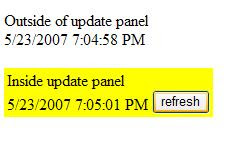
Sample asp.net ajax below show you a simple coding for asp.net ajax to refresh date time without reload the page


Result - After compile the code, Both date time is same.

ASP NET AJAX Coding for Refresh Date Time without RefreshResult - After user click the refresh button, is only update the date time in <asp:update panel>
ASP NET AJAX Coding for Refresh Date Time without Refresh

.aspx - asp net Front Page
<body>
<form id="form1" runat="server">
Outside of update panel <br />
<asp:Label ID="noAjaxtimetxt" Text="" runat="server"></asp:Label>

<br /><br />
<table bgcolor="yellow"><tr><td>

Inside update panel
<asp:ScriptManager ID="ScriptManager1" runat="server" />
<asp:UpdatePanel ID="UpdatePanel1" runat="server">
<ContentTemplate>


<asp:Label ID="Ajaxtimetxt" Text="" runat="server" />
<asp:Button ID="btn" Text="refresh" runat="server" />

</ContentTemplate>
</asp:UpdatePanel>


</td></tr></table>
</form>

</body>

.vb - asp net Code Behind Page
Protected Sub Page_Load(ByVal sender As Object, ByVal e As System.EventArgs) Handles Me.Load
noAjaxtimetxt.Text = Date.Now()
Ajaxtimetxt.Text = Date.Now()
End Sub